Introduction of Cloud Computing —— one of the NUS SOC Workshop courses.
I. Course Overview
This course centers on cloud computing and cloud-native application development, and is divided into the following core modules:
1. Cloud Computing Fundamentals
- Definition and characteristics
- NIST definition: a model for on-demand access to computing resources (networks, storage, servers, etc.), characterized by elasticity, measurability and resource sharing.
- Key characteristics: on-demand self-service, broad network access, resource pooling, rapid elasticity, measured service.
- Service models
- IaaS (Infrastructure as a Service): provides low-level resources such as virtual machines and storage (e.g. AWS EC2).
- PaaS (Platform as a Service): provides development environments and tools (e.g. Google App Engine).
- SaaS (Software as a Service): use the application directly (e.g. Gmail).
2. Virtualization Technology
- Virtual machines (VMs)
- A hypervisor (e.g. KVM) emulates a complete hardware environment, and each VM runs its own operating system.
- Drawbacks: high resource overhead, slow startup, complex deployment.
- Containers
- Share the host operating system’s kernel; isolation is achieved through namespaces and control groups (cgroups).
- Advantages: lightweight, fast startup, layered image reuse (e.g. Docker images).
3. Container Orchestration (Kubernetes)
- Core function: automated deployment, scaling and management of containerized applications.
- Core concepts
- Pod: the smallest schedulable unit, containing one or more containers that share resources.
- Control Plane: includes the API Server, Scheduler, etcd, etc., and is responsible for managing the cluster.
- Worker Node: a machine that runs Pods; contains the kubelet and a container runtime (e.g. Docker).
4. Cloud-Native Application Development
- Kubernetes-based cloud-native design patterns (e.g. microservices, DevOps integration).
- Building end-to-end applications from open-source components (databases, message queues, machine learning frameworks).
II. How to Understand Docker?
1. Core Docker Concepts
- Image
- A static file snapshot containing the application code, dependency libraries and environment configuration (defined through a Dockerfile).
- Layered structure: base layers (e.g. Ubuntu) can be reused; modifications on top produce new layers.
- Container
- A running instance of an image, providing an isolated process space.
- Advantage: solves environment-dependency problems (“it runs in development but not in production”).
2. Docker Architecture
- Components
- Docker Client: the user’s command-line tool (e.g.
docker build). - Docker Daemon: the background service that manages the container lifecycle.
- Registry: an image repository (e.g. Docker Hub).
- Docker Client: the user’s command-line tool (e.g.
3. Differences Between Docker and Virtual Machines
| Feature | Docker container | Virtual machine |
|---|---|---|
| Resource usage | Lightweight (shared kernel) | High (separate OS) |
| Startup time | Milliseconds | Minutes |
| Isolation | Process-level (weaker) | Hardware-level (stronger) |
| Typical uses | Microservices, rapid deployment | Traditional applications, multi-OS environments |
4. My Own Understanding
Compared with a virtual machine, which emulates the entire hardware environment and consumes a lot of resources, a Docker container shares the host kernel, achieves thread-level isolation, and enforces resource limits through namespaces and control groups.
Note: Docker is only one implementation of container technology; others include LXC, rkt, etc.
III. How to Understand Kubernetes (k8s)?
1. The Core Role of Kubernetes
- Automated container management: including deployment, scaling in and out, and self-healing (e.g. automatically restarting a container after it crashes).
- A unified abstraction layer: hides differences in the underlying infrastructure, enabling applications to migrate across clouds.
Kubernetes Architecture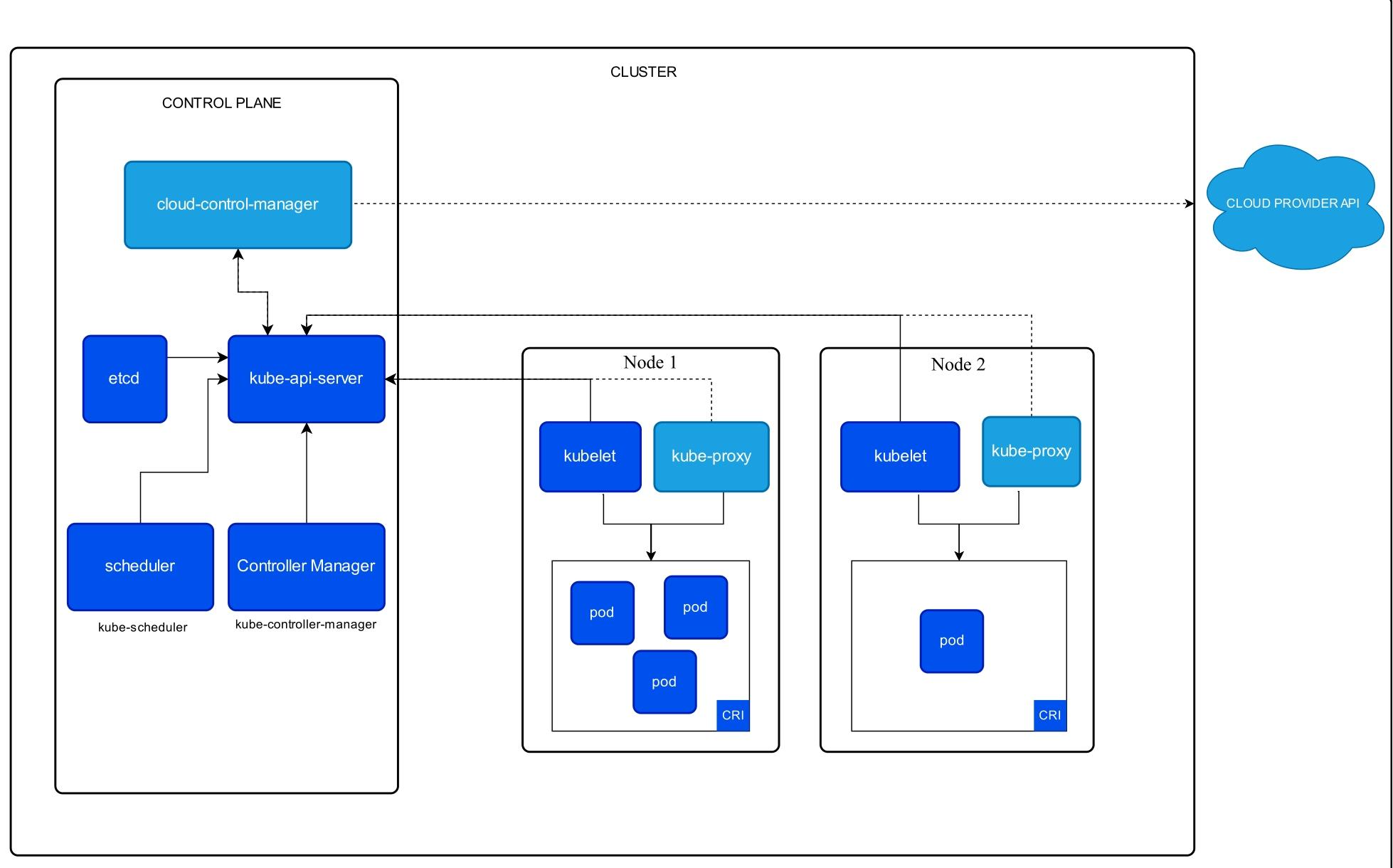
2. Core Components
- Control plane
- API Server: the entry point for cluster operations.
- etcd: a distributed key-value store that holds the cluster state.
- Scheduler: assigns Pods to suitable nodes.
- Worker nodes
- kubelet: manages the containers on a node.
- kube-proxy: handles network communication (e.g. service discovery).
3. Pros and Cons of Kubernetes
| Pros | Cons |
|---|---|
| Improves resource utilization | Steep learning curve (must master YAML, Pods and other concepts) |
| Supports elastic scaling | High operational complexity (cluster state must be managed) |
| Powerful ecosystem (backed by CNCF projects) | Limited support for stateful applications (e.g. databases) |
Translated from the Chinese original.