Virtual machines.
Overview
Virtual Machine (VM) is an abstraction of a physical machine that allows multiple operating systems to run concurrently on a single hardware platform. VMs provide isolation, resource management, and flexibility in deploying applications.
Components
- Host: the underlying hardware system
- VMM (Virtual Machine Manager): emulates the hardware environment and provides the same interface as the host so that virtual machines can run
- Guest: a process that is given a virtual copy of the host, usually an operating system
System Model
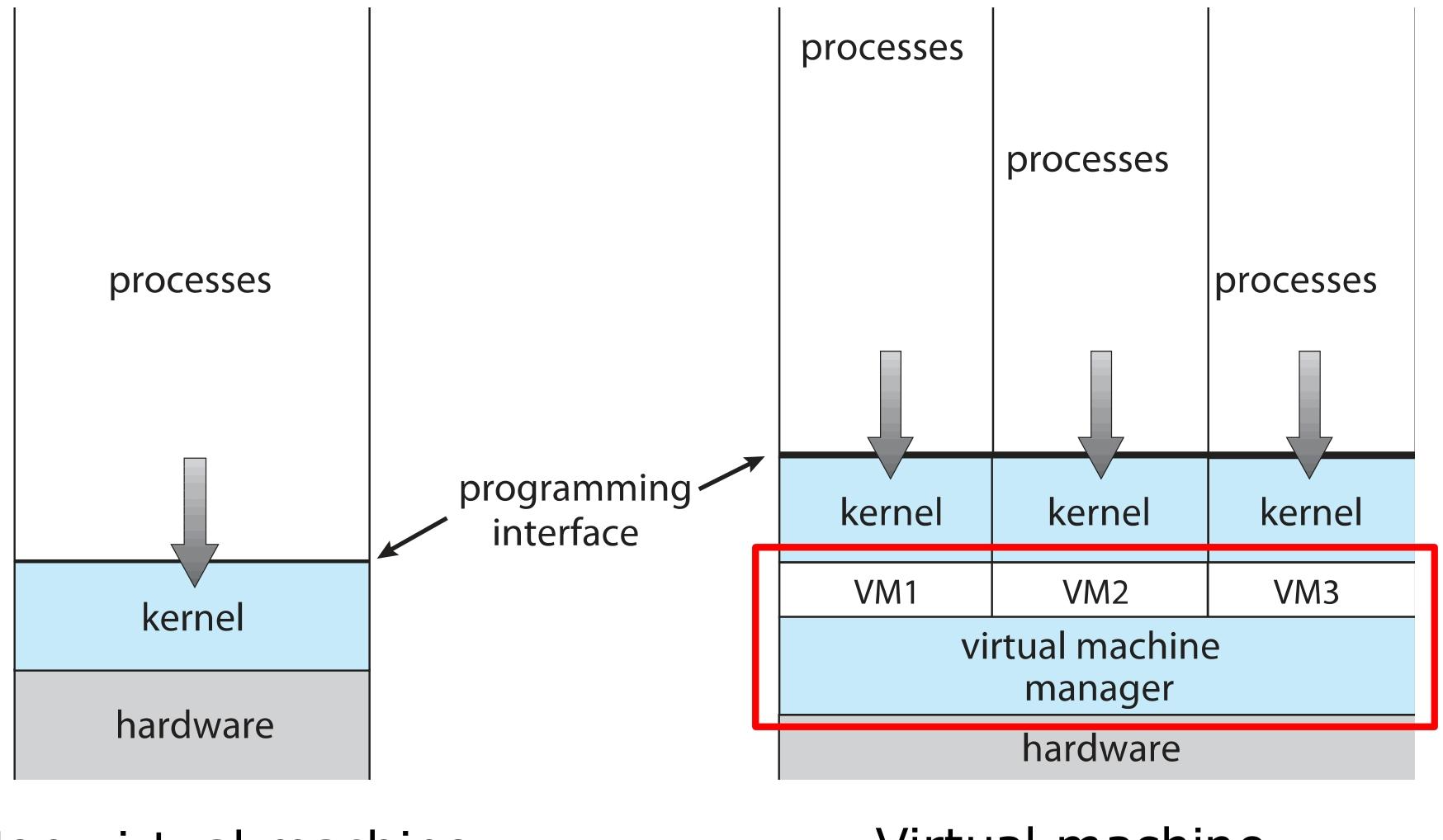
VM Benefits and Features
| Benefit / Feature | Description | Example Use Case |
|---|---|---|
| Security isolation | Protects the host system from the virtual machines and prevents virtual machines from interfering with each other, reducing the risk of virus propagation | In an enterprise multi-user server environment, a virus infecting one virtual machine will not easily spread to the other virtual machines or the host |
| Resource sharing | Shares resources through shared file systems and network communication, improving resource utilization | In a cloud computing data center, the virtual machines of many users share the server’s compute, storage and other resources |
| Flexible operations | Supports freezing (suspending), migration, cloning, and restoring from snapshots | In software development and testing, developers clone a virtual machine that contains the development environment to quickly set up multiple identical test environments; testers use snapshots to restore the virtual machine’s state and avoid repeating tests |
| Multi-OS support | Allows multiple operating systems of different types to run on a single physical machine | Computer enthusiasts and professionals create virtual machines running different operating systems such as Windows and Linux on the same computer, which is convenient for development, testing and learning |
| Aid to system development | Facilitates operating system research, lowering its cost and risk and improving the safety and efficiency of system development | Operating system researchers experiment with new features inside a virtual machine; if something goes wrong the physical machine is not damaged |
| Templating | Create a virtual machine template containing an operating system and applications, then quickly generate multiple virtual machine instances with the same configuration | Software vendors pre-install their software in a virtual machine template; after delivery, customers can deploy and use it quickly |
| Live migration | A running virtual machine can be migrated between hosts without interrupting user access | When a data center performs hardware maintenance or upgrades, virtual machines are migrated to other hosts so that business systems keep running continuously and stably |
VM Building Blocks
VCPU
The CPU resource the VMM provides to the Guest, usually a virtualization of the physical CPU.
VCPUs are implemented by time-sharing the physical CPU.
Non-privileged instructions execute directly; privileged instructions go through the VMM via Trap and Emulate.
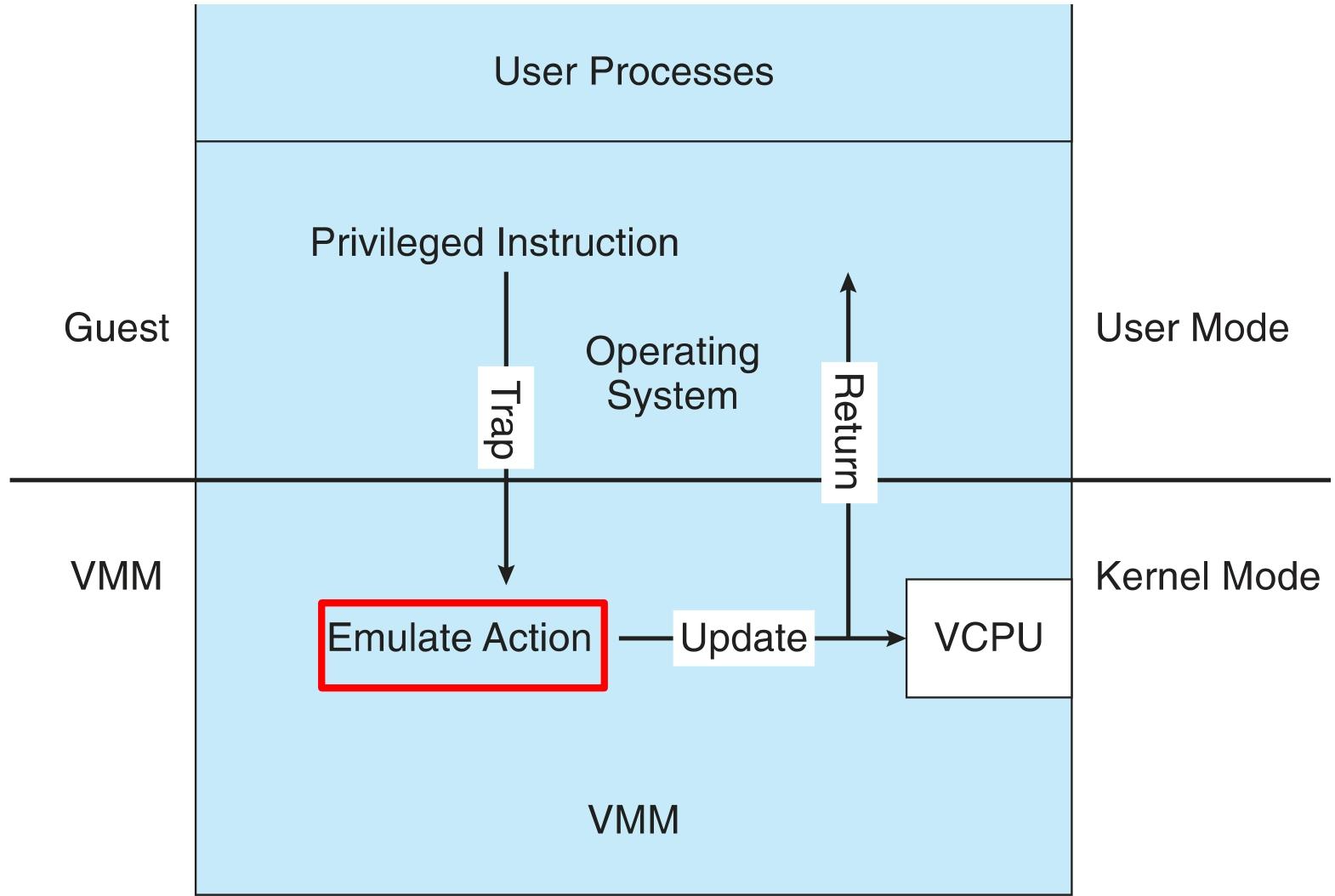
Trap and Emulate
The VM’s kernel mode and user mode both actually run in user mode.
When a privileged instruction is executed, the CPU generates a trap; the VMM catches the trap, performs the corresponding handling, and then hands control back to the VM.
Binary Translation
Some CPUs don’t have clean separation between privileged and nonprivileged instructions.
The VMM inspects privileged instructions ahead of time and translates them into equivalent non-privileged instructions.
Nested Page Tables
Nested Page Tables let the guest and the VMM each manage their own page tables, while hardware assistance (such as the Intel VT-x and AMD-V instructions) improves virtualization performance.
VM Types and Implementations
| VM Type | Definition | Characteristics | Typical Examples | Use Cases |
|---|---|---|---|---|
| Type 0 Hypervisor | A hardware feature implemented in firmware that supports the creation and management of virtual machines | - The operating system needs no special setup; the VMM is integrated into the firmware - Relatively small feature set; each guest has dedicated hardware - I/O management is difficult; shared I/O is sometimes implemented through a control partition - Supports nested virtualization | IBM LPARs, Oracle LDOMs | Suitable for scenarios with extremely high security and isolation requirements and special needs for hardware resource allocation, such as the core business systems of large enterprises |
| Type 1 Hypervisor | Operating-system-like software that has virtualization features as well as the standard features of a general-purpose operating system | - Commonly used in corporate data centers, becoming the “data center operating system” - Runs in kernel mode for this special purpose, directly creating, running and managing guest operating systems - Can provide traditional operating system services such as CPU scheduling and memory management - Can run on top of a Type 0 Hypervisor | VMware ESX, Joyent SmartOS, Citrix XenServer, Microsoft Windows Server with HyperV, RedHat Linux with KVM | Data centers consolidate multiple operating systems and applications to improve hardware utilization; guests are migrated flexibly according to business load to balance performance |
| Type 2 Hypervisor | An application running on a standard operating system that provides VMM features to guest operating systems | - Highly dependent on the host operating system, which is barely involved in the virtualization process - The VMM runs and is managed as an ordinary process of the host operating system - Easy to use, no modification of the host operating system needed, but overall performance is relatively poor | VMware Workstation, VMware Fusion, Parallels Desktop, Oracle VirtualBox | Suitable for individual developers and testers who want to quickly set up multiple different virtual environments on their everyday operating system for development, testing and learning |
| Paravirtualization | The guest operating system must be modified to cooperate with the VMM; the VMM does not provide an environment identical to the underlying hardware | - Somewhat better performance, especially for I/O operations - Originally used to implement virtualization on older x86 CPUs that did not support binary translation - With modern CPUs, some scenarios no longer require modifying the guest operating system | Xen | Suitable for scenarios with high performance requirements where one is willing to make some modifications to the guest operating system to optimize virtualization performance |
| Programming Environment Virtualization | Not hardware virtualization in the true sense; it optimizes program execution by providing the API of a specific programming environment | - The programming language runs inside a virtualized environment, e.g. Java relies on the Java Virtual Machine (JVM) - Achieves “write once, run anywhere”, improving cross-platform portability - Has optimization mechanisms such as garbage collection and just-in-time compilation | Java Virtual Machine (JVM) | Suitable for developing and running cross-platform programming-language applications, such as the development and deployment of Java and Python applications |
| Emulation | Allows an operating system or application compiled for another architecture to run on a host with a different CPU architecture | - Supports execution across architectures by translating the guest’s instructions - Large performance penalty, much slower than native code - Commonly used in gaming to emulate old game consoles | Running old games; running legacy applications compiled for an old CPU architecture on new servers | |
| Application Containment (Containers) | Creates a virtual layer between the operating system and applications to provide application isolation, performance and resource management | - Based on the host operating system’s kernel; applications inside a container run like independent processes - Lightweight and portable, with low resource overhead - Each container has its own applications, network configuration, user accounts, etc. | Oracle Solaris Zones, BSD Jails, IBM AIX WPARs, Docker | Suitable for microservice architectures and scenarios requiring rapid deployment and elastic scaling, improving application security and manageability |
Translated from the Chinese original.