An introduction to the concepts related to file systems.
File Concepts
A file is a named collection of related information stored on secondary storage.
Types:
- Text
- Source/object programs
- Executable programs
- Database records
- Graphic images
- Multimedia
| file type | usual extension | function |
|---|---|---|
| executable | exe, com, bin or none | ready-to-run machine language program |
| object | obj, o | compiled, machine language, not linked |
| source code | c,cc,java,pas, asm, a | source code in various languages |
| batch | bat, sh | commands to the command interpreter |
| text | txt, doc | textual data, documents |
| word processor | wp, tex, rtf, doc | various word-processor formats |
| library | lib, a, so, dll | libraries of routines for programmers |
| print or view | ps, pdf, jpg | ASCII or binary file in a format for printing or viewing |
| archive | arc, zip, tar | related files grouped into one file, sometimes com pressed, for archiving or storage |
| multimedia | mpeg, mov, rm, mp3,avi | binary file containing audio or |
File Attributes
- Name
- Identifier:
- A unique identifier inside the file system
- Assigned by the operating system
- Type
- Location:
- The location of the file on disk
- Assigned by the operating system
- Size
- Protection information:
- Access permissions
- File owner
- Access permissions of other users
- Time, date and user identification:
- Creation time
- Modification time
- Last access time
- User identification
File Structure
- No structure
- Simple structure
- Fixed-length records
- Variable length
- Complex structure
- Formatted documents
- Relocatable load files
File Operations
Create, open, close, read, write, rename, delete, reposition (it allows a user or program to directly access a specific position in a file without having to read the whole file sequentially.)
File Access Methods and Protection
Access Methods
- Sequential Access
- Reading can only start from the beginning of the file
- Only sequential access is possible
- Direct Access
- Allows reading and writing at any position in the file
- Allows random access
- Indexed Access
Protection
Basic operation permissions: r w x read, write, execute
User groups: owner, group, public
Directory Structures
A disk can be subdivided into multiple partitions, which are also called minidisks or slices.
A partition can be used to store a file system; an entity that contains a file system is called a volume.
Each volume records the relevant information about its file system in a device directory or volume table of contents.
A disk or partition can also choose not to use a file system, i.e. be used as a raw device, or be formatted and then used with a specific file system.
Disks can be protected with RAID to guard against failures.
Directory Structure
| Directory type | Structural characteristics | Advantages | Disadvantages | Application scenarios and examples |
|---|---|---|---|---|
| Single-level directory | All users share one directory; files are stored directly in that directory with no hierarchy | Simple structure, easy to understand and implement | Low file lookup efficiency; lookup time grows sharply as the number of files increases; prone to naming conflicts, different users can hardly use the same file name; cannot effectively protect users’ private files, since all files are on the same level and can easily be accessed and modified by other users; lacks the ability to group files, making it inconvenient to categorize and manage them | Early simple operating systems, or specific scenarios with very few files and low requirements for security and ease of management. For example, some simple embedded systems that only store a few configuration files may use it |
| Two-level directory | An independent directory is created for each user, forming a two-level structure; each user’s files are stored under their own directory | Solves the file name conflict problem between different users; the same file name can exist in different user directories; file lookup efficiency is improved compared with a single-level directory, since only the specific user directory needs to be searched | Limited file grouping capability; files can only be roughly distinguished by user, and cannot be grouped more finely by file attributes, purpose, etc. | Suitable for scenarios with a relatively fixed number of users that have certain security requirements for file management but not very complex file grouping needs. For example, early multi-user small office systems, where each user has their own file directory |
| Tree-structured directory | Starting from the root directory, a multi-level tree hierarchy is formed; a directory can contain files and subdirectories | Clear hierarchy, convenient for categorizing, managing and finding files; users can put files into different subdirectories by category; flexible file organization that can be extended in depth and breadth as needed | - | Widely used in all kinds of operating systems, such as the file management of mainstream operating systems like Windows, Linux and Unix. Users create different folders in the operating system to store different types of files such as documents, pictures and programs |
| Acyclic-graph directory | Allows shared subdirectories and files; files or subdirectories are shared through links | Can effectively reduce the storage space occupied by files; multiple directories can share the same file or subdirectory, avoiding duplicate storage; convenient for file sharing and collaboration, multiple users or projects can share the same file resources | Deleting a shared file may cause dangling pointer problems; if handled improperly, pointers point to invalid locations, affecting system stability; implementation and management are relatively complex, requiring extra handling of shared links and consistency maintenance | Suitable for scenarios with high file sharing demands, such as a company’s internal document management system, where multiple departments may need to share certain files; in software development teams, multiple projects may share some common code files |
| General graph directory | A more complex directory structure with more flexible linking, allowing links to files and subdirectories | Provides extremely high flexibility; complex file relationships can be built according to actual needs | The cycle problem that may arise when adding links must be solved, otherwise the directory structure becomes chaotic; difficult to implement and manage, with high demands on system resources and algorithms | May be used in some professional fields with extremely high requirements for file organization flexibility, such as the organization of data files in large database management systems; file management for complex research projects that need to build complex file relationships |
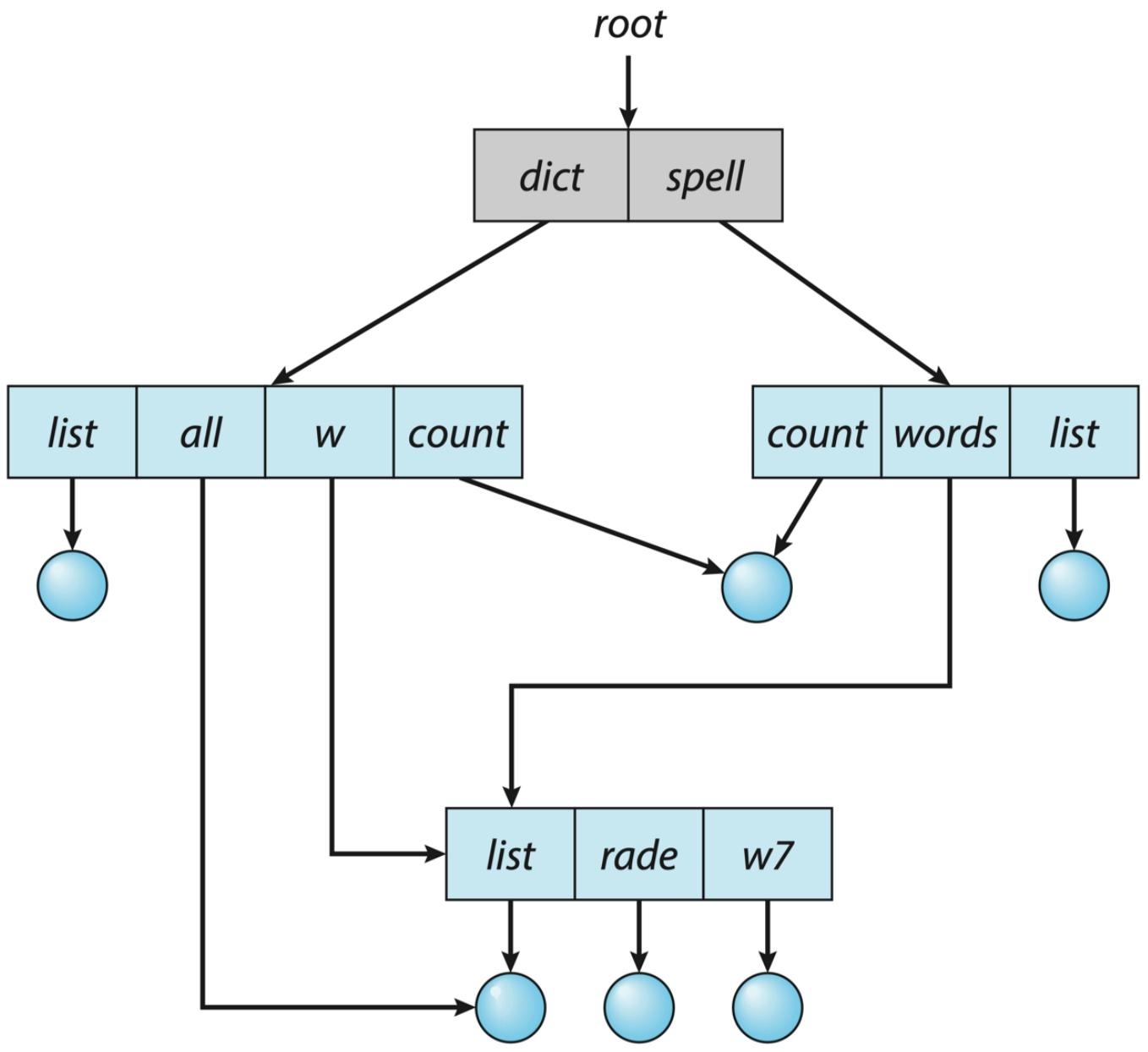
Two ways of implementing an acyclic-graph directory:
- Links
- Duplicating the file information
Deleting a file easily produces dangling pointers; this can be handled by dealing with the links when the file is deleted / keeping the file until all references are deleted.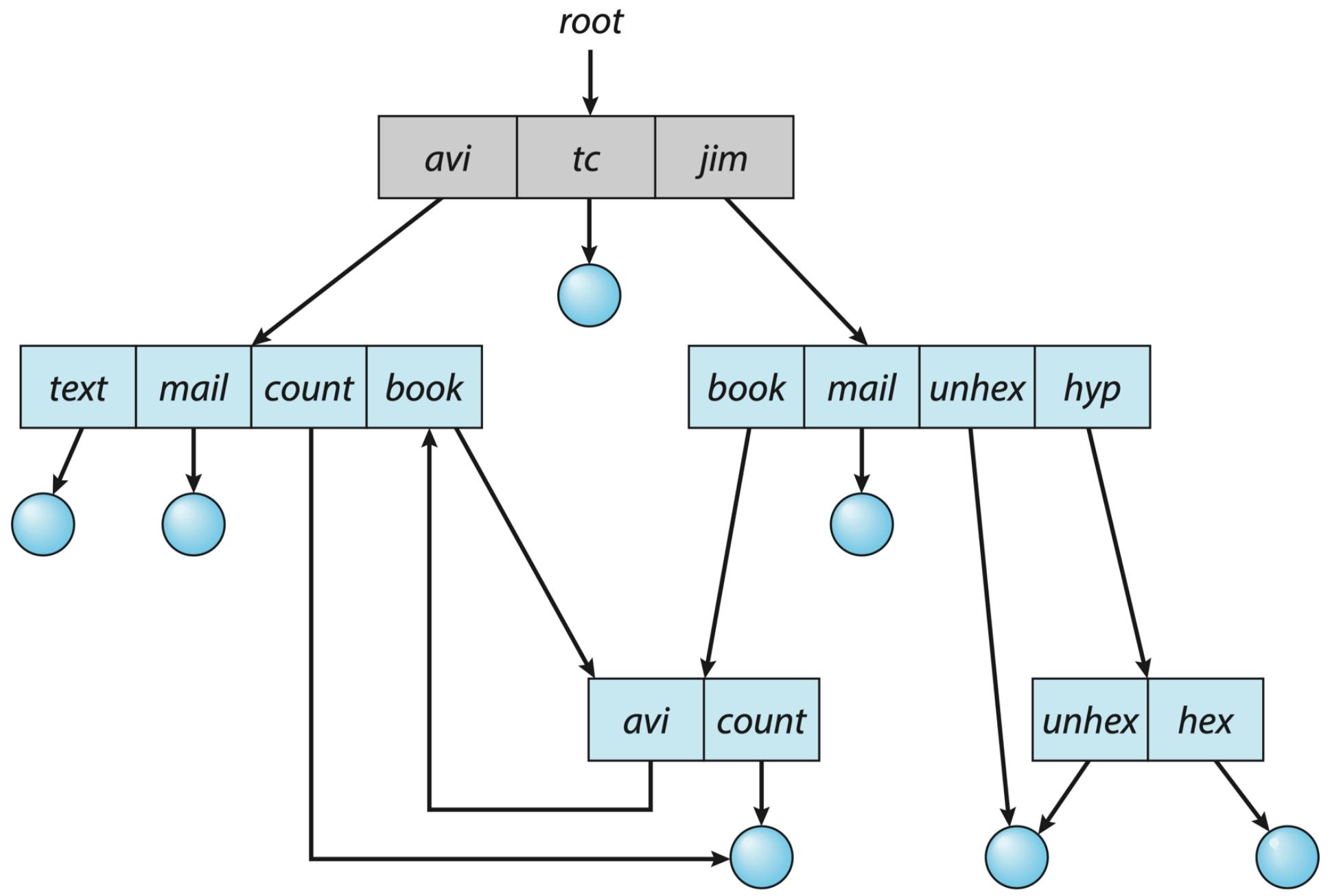
General graph directory: files/subdirectories can be linked, but cycles are not allowed (garbage collection)
Directory Implementation
- Linear List
- Hash Table
File System Structures and Operations
Front end: concerned with how the file system is presented to users, providing users with an interface for operating on files
Back end: responsible for creating the algorithms and data structures that map the logical file system onto the physical secondary storage devices
Layered File System
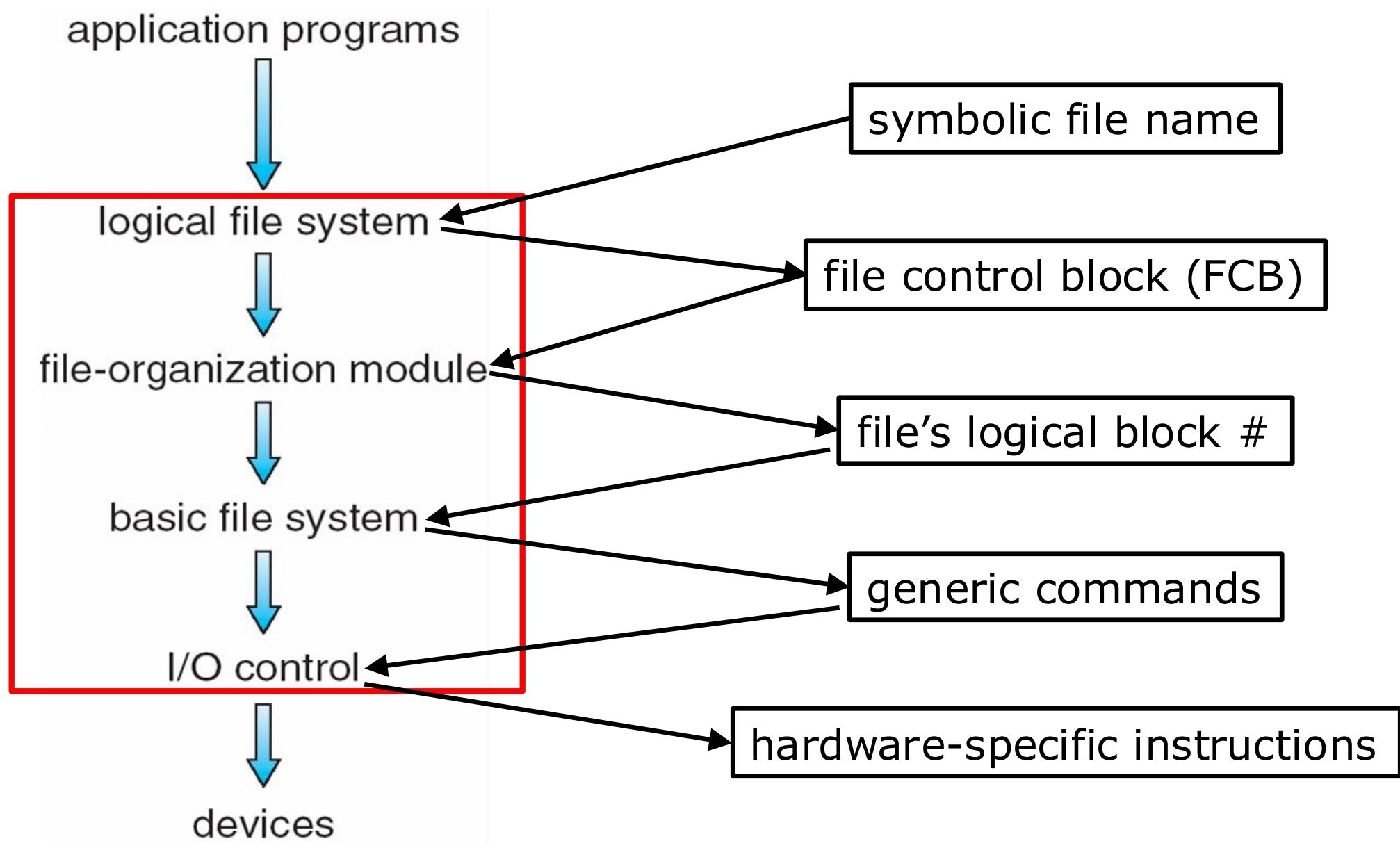
| Layer | Function | Characteristics | Relationship with other layers | Related data structures |
|---|---|---|---|---|
| Device driver layer (I/O control layer) | Translates logical addresses into hardware-specific commands and controls data transfer of I/O devices | Acts like a translator, interacting directly with the hardware | Receives commands from the basic file system and operates the hardware | No independent specific data structure; relies on the data structures of the hardware controller |
| Basic file system layer | Issues commands to the device driver layer based on logical addresses; manages I/O scheduling, memory buffers and caches | Responsible for low-level data block reads and writes, optimizing I/O operations | Gets information from the file-organization module, issues commands to the device driver layer, and provides data to the logical file system | Memory buffers, caches |
| File-organization module layer | Manages the logical structure of files, keeps track of logical blocks and free blocks, and allocates space | Understands the logical blocks of files and manages free space | Receives requests from the logical file system and provides logical block information to the basic file system | Data structures related to the free-space manager |
| Logical file system layer | Manages metadata, translates file names into file numbers etc., and performs directory management and file protection | Maintains the logical view and security of the file system | Interacts with applications and calls the functions of the file-organization module | File control block (FCB, e.g. the inode in Unix), containing permissions, dates and other information |
File-System Operations
- On-storage data structures
- Boot control block: one per volume; if the volume contains the operating system, it is usually located at the beginning of the volume and stores the information needed to boot the system.
- Volume control block: one per volume; records detailed information such as the total number of blocks, the number of free blocks, the block size and free-block pointers.
- Directory structure: organizes files and stores file names and inode numbers etc., making files easy to locate and access.
- File control block: one per file; contains the file’s detailed attributes such as identifier, permissions, size and dates.
- In-memory data structures
- Mount table: records information about each mounted volume, used by the system to identify and manage volumes.
- Directory-structure cache: caches recently accessed directory information to improve the efficiency of file lookup and operations.
- System-wide open-file table: stores a copy of the FCB of each open file and other related information, tracking and managing all open files.
- Per-process open-file table: contains pointers into the system-wide open-file table, as well as process-specific information about the files it has opened.
- Buffers: temporarily hold file system blocks during file reads and writes, bridging the speed gap between disk and memory.
Partitions and Mounting
- Partition
- Definition and purpose: partitioning divides a disk into multiple relatively independent logical regions. A partition can be a “cooked” volume containing a file system; if that file system is bootable, the partition also needs to store boot information. It can also be a “raw” volume that contains no file system and is just a sequence of blocks. The root partition is generally used to hold the operating system, while other partitions can store different types of operating systems, file systems, or remain raw.
- Booting: the boot block is crucial in a partition; it can point to the boot volume or to a set of boot-loader blocks containing the code that loads the kernel. In the case of booting multiple operating systems, the boot block can point to a boot manager.
- Mounting
- Concept of mounting: mounting is the process of attaching a storage device or its file system to the operating system’s directory tree, so that the files on the device become accessible to the system. For example, after an external storage device is mounted onto some directory of the system, users can access the files on the device through that directory path.
- Mounting methods: the root partition is usually mounted at system boot, while the mounting of other partitions is more flexible: they can be mounted automatically at system boot, or mounted manually by users as needed.
Allocation Methods
An allocation method refers to how disk blocks are allocated for files
- Contiguous Allocation
- Linked Allocation
- Indexed Allocation
Extension: File-Allocation Table (FAT)
I-node Example
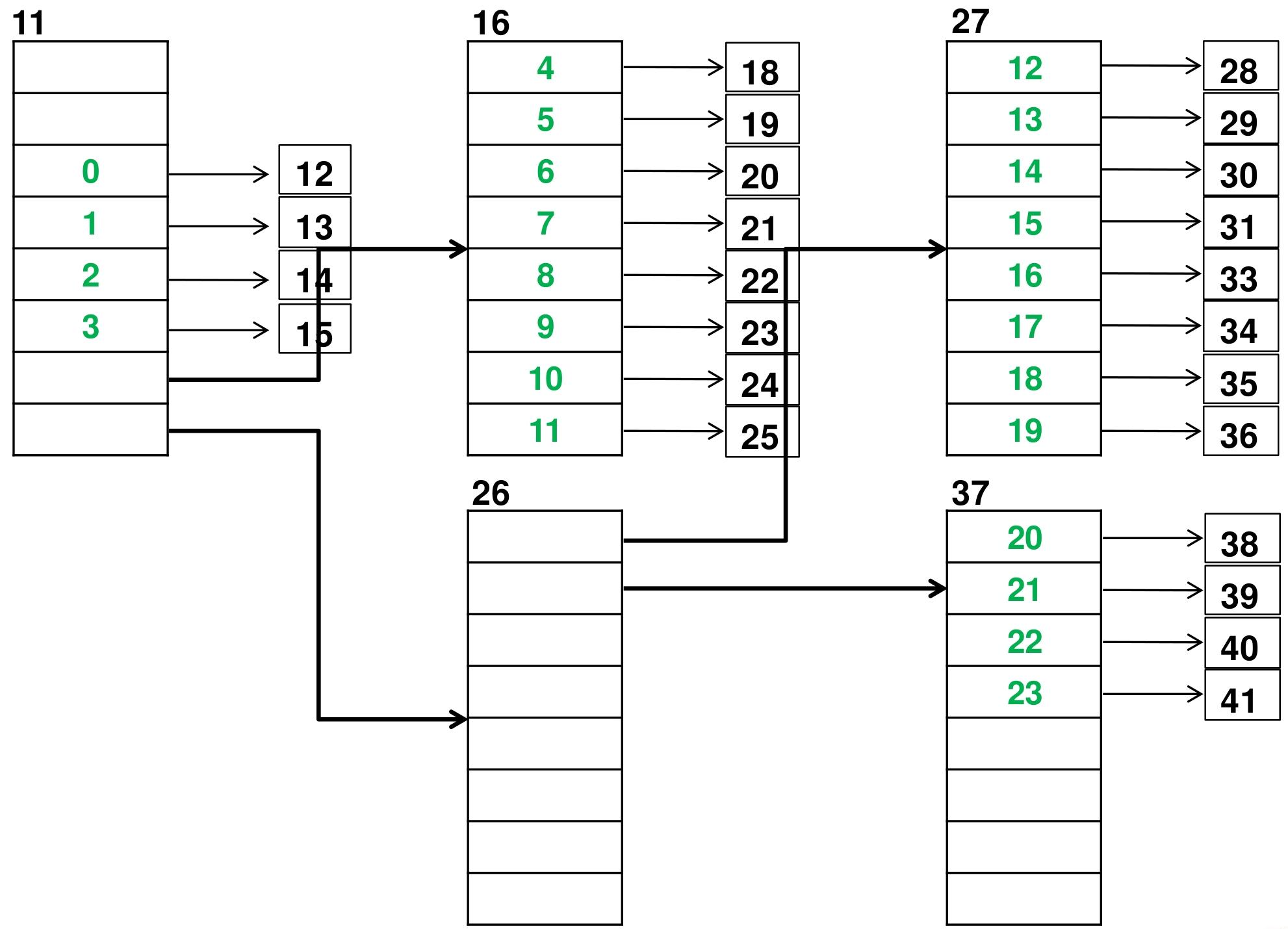
Green: logical blocks. Black: physical disk blocks
Combined with Disk Scheduling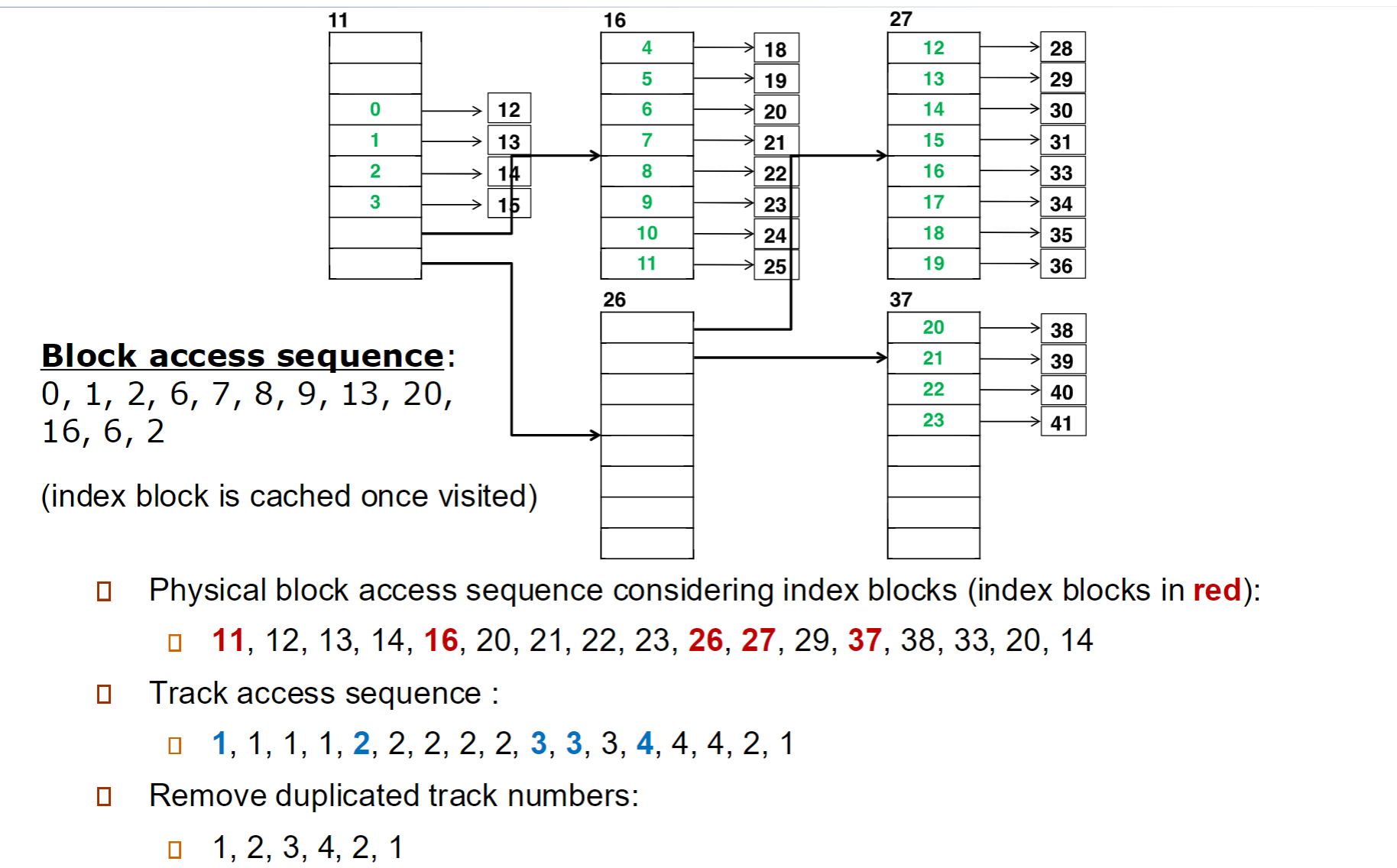
Free Space Management
- Bit Vector/Map: a bit vector indicates whether each block is free (0/1)
- Linked List: all free blocks are organized into a linked list
- Grouping and Counting: the free blocks on the storage device are divided into groups, and a counter is set for each group of free blocks
- Space Maps: a data structure is created to record the usage state of each block on the storage device in detail
Virtual and Remote File Systems
VFS: a software layer that provides the operating system with a unified file system interface. It acts as an abstraction layer between the operating system kernel and the concrete file system drivers. It includes a caching mechanism for file system objects and can support multiple different types of file systems at the same time.
Remote file systems enable sharing of files across a network.
Translated from the Chinese original.