An introduction to secondary storage and disk scheduling techniques.
Overview of Mass Storage Structure
secondary storage:
- HDDs: hard disk drives
- NVM: nonvolatile memory
HDD
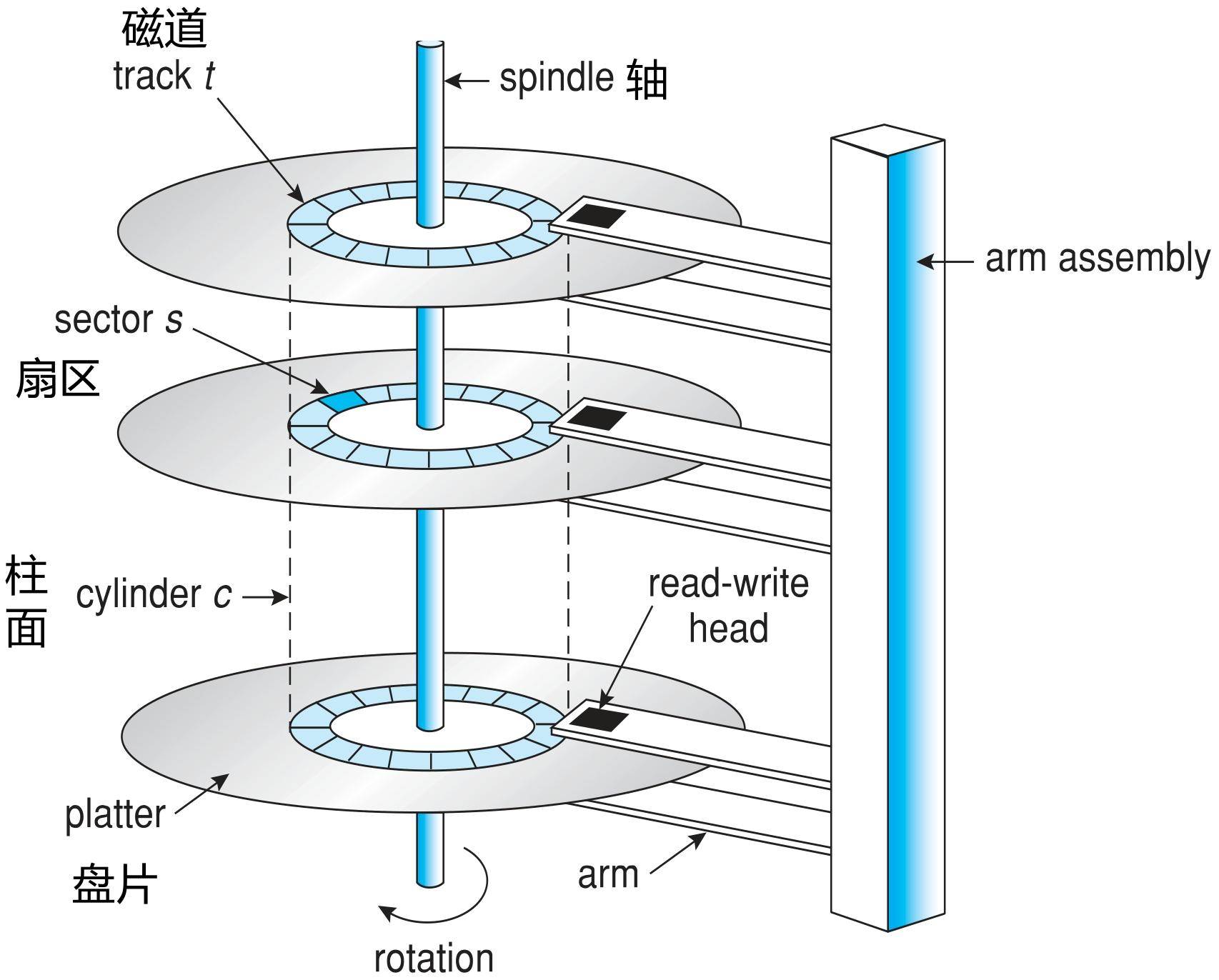
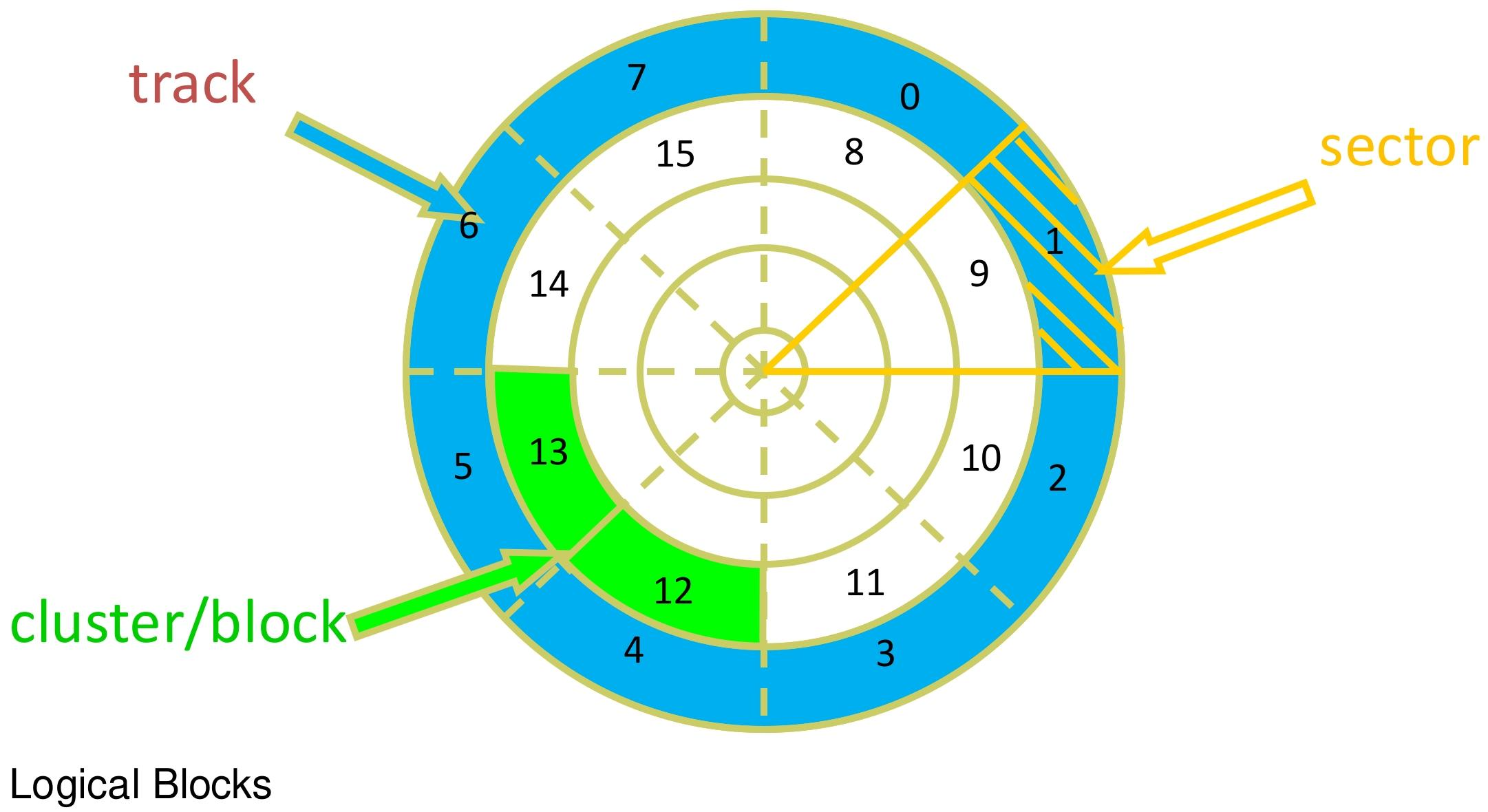
A disk drive is treated as a large one-dimensional array of logical blocks, where the logical block is the smallest unit of data transfer. Low-level formatting creates the logical blocks on the physical medium, and these logical blocks are mapped sequentially onto the sectors of the disk.
Mapping order: the mapping proceeds in order through the sectors of a track, then through the remaining tracks of that cylinder, and finally through the remaining cylinders from the outermost to the innermost.
Bad sectors exist and are unusable
Average access time = average seek time + average latency
In disk I/O operations, the calculation of rotational delay is related to the disk’s rotation rate. The formula is:
where rotation rate is the number of revolutions per minute (RPM, Revolutions Per Minute). This is because the disk rotates at a constant speed, and on average the time spent waiting for the data to arrive under the head is the time for half a rotation of the disk
Average I/O time = average access time + (amount to transfer / transfer rate) + controller overhead
Influencing factors: transfer rate, seek time, latency
NVM
| Category | Details |
|---|---|
| Common forms | 1. Flash-based nonvolatile memory used in a disk-drive-like container, called a solid-state drive (SSD) 2. USB drives (thumb drives, flash drives) 3. DRAM disk replacements 4. Storage devices mounted on the surface of the motherboard 5. The main storage of devices such as smartphones |
| Comparison with HDDs | 1. Reliability: possibly more reliable than HDDs 2. Cost: higher cost per MB 3. Lifespan: possibly shorter, needs careful management 4. Capacity: relatively smaller capacity 5. Speed: much faster 6. Interface: standard buses may be too slow, so they are usually connected directly to the system bus (e.g. PCIe); no seek time or rotational delay |
| Technical challenges | 1. Reads and writes are done in units of “pages”, but they cannot be overwritten in place; they must be erased first, and erasing is done in larger units called “blocks” 2. The number of erases is limited, about 100,000 3. Lifespan is measured in drive writes per day (DWPD); e.g. a 1TB NAND drive rated at 5DWPD is expected to be written with 5TB per day for the warranty period without failing |
| Controller algorithms | 1. Flash translation layer (FTL) table: since in-place overwriting is impossible, pages contain both valid and invalid data, and the controller tracks the valid logical blocks by maintaining an FTL table 2. Garbage collection: copy the good data elsewhere to free up erasable blocks, and allocate over-provisioning to give garbage collection working space, e.g. reserving 20% of the pages for writing data during garbage collection 3. Wear leveling: every storage cell has a finite lifespan, so writes need to be spread evenly over all cells to prevent frequently erased blocks from shortening the device’s lifespan |
Volatile Memory
- Volatile memory mainly refers to DRAM (dynamic random-access memory), whose defining characteristic is that the stored data is lost when power is cut. Technically it is not secondary storage in the strict sense, but in practice it is often used as a high-speed secondary storage device.
- Form of use: it usually appears in the form of a RAM drive. Such drives are treated as raw block devices and are generally formatted with a file system. They appear in many mainstream operating systems: for example, on Linux it corresponds to /dev/ram, on macOS it can be created with the diskutil command, and Linux’s /tmp file system of type tmpfs is also based on this principle. This lets users use standard file operations to store data temporarily in memory while keeping the data safe.
- Performance advantage: for operations such as creating, reading, writing and deleting files and their contents, I/O on a RAM drive is the fastest possible way. This gives it a huge advantage in scenarios that need high-speed temporary storage; for instance, when handling temporary data with extremely demanding read/write speed requirements, volatile memory can significantly improve processing efficiency.
Disk attachment
- Attached directly to the host
- Attached to the host over a network
- Cloud storage
Disk Scheduling
Disk I/O requests come from many sources, including the operating system, system processes and user processes. The operating system maintains a request queue for each disk or device. When the disk is idle, an I/O request can be serviced; if the disk is busy, new requests must wait in the queue.
The main goal of disk scheduling is to minimize seek time, because seek time accounts for a large share of disk access time, and reducing it can significantly improve disk performance. Rotational latency is hard for the operating system to compute precisely, so disk scheduling algorithms mainly optimize for seek time.
Scheduling Algorithms
- First-Come, First-Served (FCFS) Scheduling
- Shortest Seek Time First (SSTF) Scheduling
- SCAN Scheduling: move toward one end first, then reverse direction on arrival
- C-SCAN Scheduling: move toward one end first, then jump directly to the other end on arrival, which distributes seek time more evenly
- LOOK/C-LOOK Scheduling: an improvement on the two algorithms above; instead of moving all the way to the end, the head only moves to the track of the last request
- NVM Scheduling: NVM devices attached directly to the host usually need no scheduling, because they have no seek time or rotational delay
- Pass-through scheduling
- Write coalescing
Storage Device and Swap Space Management
Storage Device Management
- Low-level formatting / physical formatting: divide the disk into sectors, usually 512 bytes
- High-level formatting / logical formatting: create the file system, create the directory structure and the file allocation table. Disk I/O is done in units of blocks, file I/O in units of clusters
Root partition: holds the operating system, mounted at the root directory when the system boots
Mounting: integrating a storage device into the operating system’s file system directory structure, so that users and applications can operate on the data in the storage device as if accessing local files.
Boot block: the boot block is the first sector, or a sector at a specific location, on the storage device, and contains the initial program code needed to boot the computer
Swap-Space Management
When memory is insufficient, the operating system moves part of the memory contents to a swap space on disk, freeing memory for other processes to use. The swap space can be a dedicated partition or a file.
Storage Attachment
Host-Attached
The computer connects to storage devices through local I/O ports; if multiple storage devices need to be attached, storage buses can be used. High-end systems use Fibre Channel (FC, Fiber Channel) technology.
Network-Attached
- Definition and concept: NAS is a technology that lets storage devices provide storage services over a network rather than through a local connection (such as a bus). It allows file systems to be mounted remotely, so that multiple clients can access the files and data on the storage device over the network.
- Implementation protocols: common protocols are NFS (Network File System) and CIFS (Common Internet File System), which use remote procedure calls (RPC) to implement communication between hosts and storage devices over IP networks, usually transferring data over TCP or UDP. In addition, the iSCSI protocol carries the SCSI protocol over IP networks, making the network the means of connection between hosts and storage devices.
- Connection method: unlike the traditional approach of connecting hosts and storage devices with SCSI cables, network-attached storage uses the network as the interconnect between hosts and storage devices. Clients connect to the NAS device over a LAN (local area network) or WAN (wide area network) to access the storage resources.
Cloud Storage
- Basic concept of cloud storage: cloud storage is similar to NAS in that both let users access storage resources over a network. But cloud storage accesses storage in a remote data center over the Internet or a wide area network (WAN), rather than over a local area network as NAS does. For example, when users use cloud storage services such as Dropbox, Microsoft OneDrive, Apple iCloud and Shanghai Jiao Tong University’s Jbox, the data is stored on servers in remote data centers, and users store and read data over the network.
- Difference between cloud storage and NAS: NAS presents itself as an ordinary file system, which users can operate on just like a local file system. Cloud storage, on the other hand, provides its service through APIs (application programming interfaces), and applications access cloud storage by calling these APIs. This is because cloud storage faces a far more complex network environment, with higher latency and possible failures, which traditional NAS protocols cannot cope with well, so APIs are used to ensure reliable data transfer and access.
RAID Structure
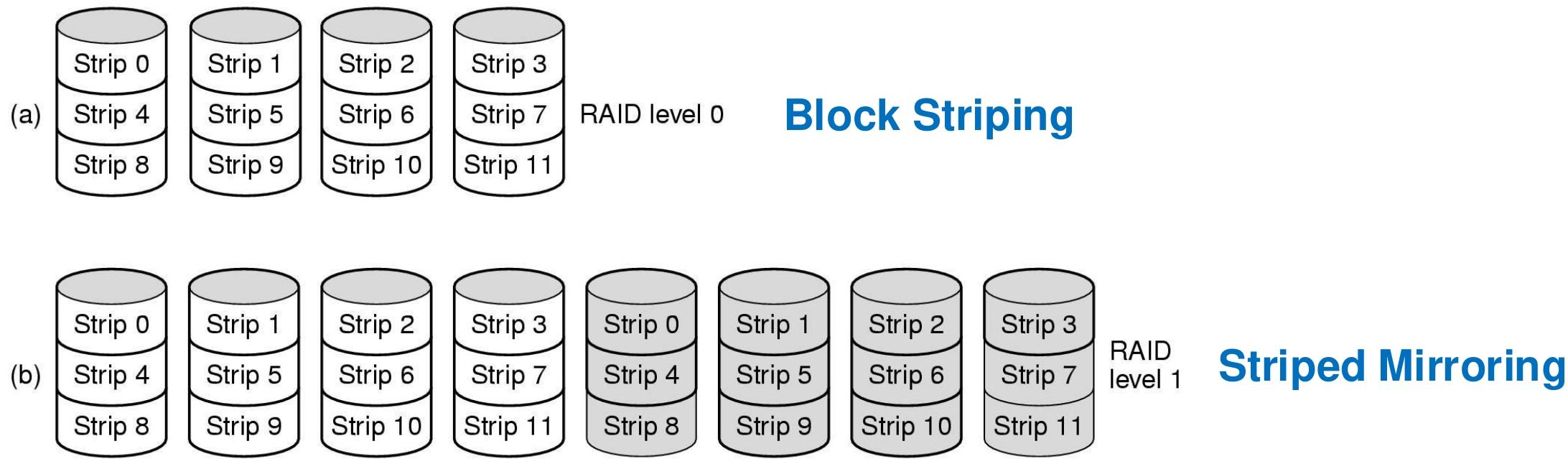
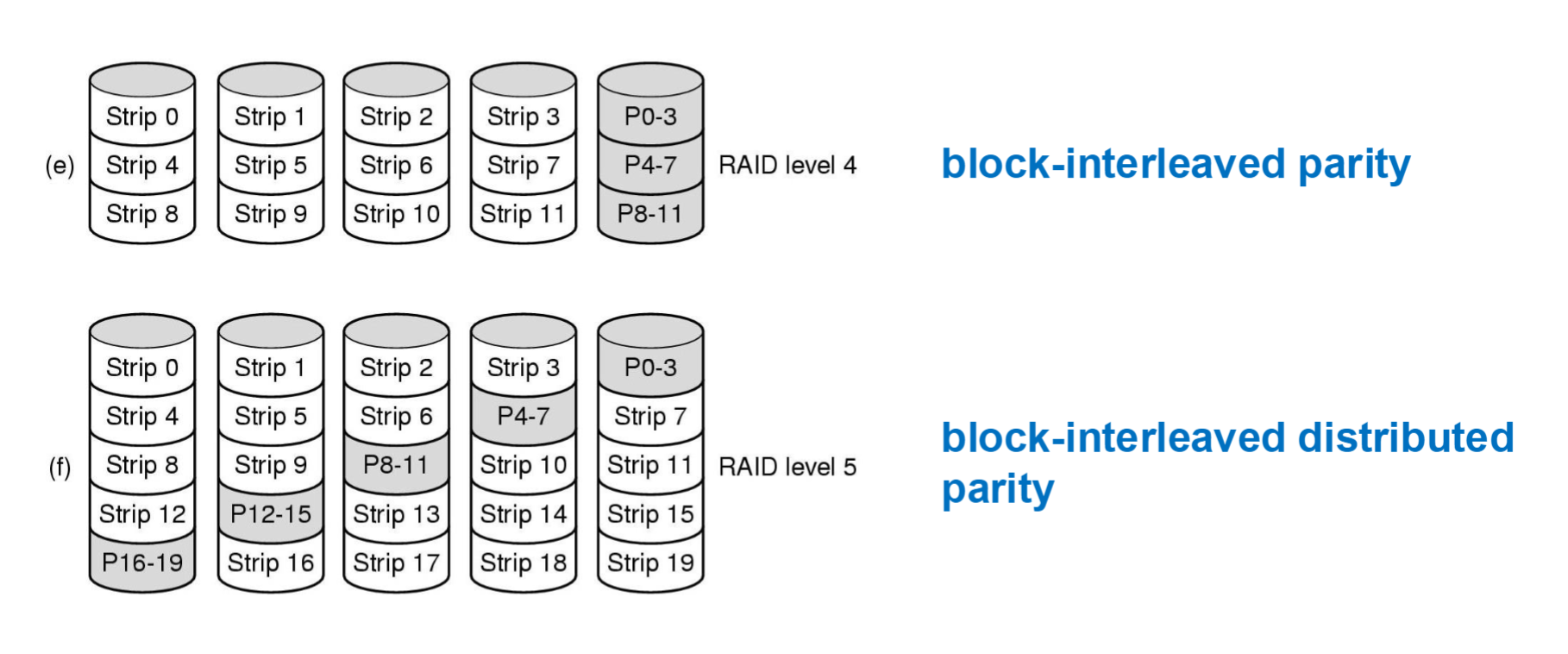
Redundant Arrays of Independent Disks (RAIDs) combine multiple independent physical disks into a single logical disk unit to improve the performance, reliability and data redundancy of the storage system. The common structure levels are as follows:
| RAID level | Name | Description | Advantages | Disadvantages | Use cases |
|---|---|---|---|---|---|
| RAID 0 | Striping | Data is spread evenly across multiple disks, written to the disks alternately in units of blocks, forming a striped storage structure | Extremely high read/write performance and fast data transfer; in theory an n-fold speedup (n is the number of disks) | No data redundancy; the failure of any one disk causes all data to be lost | Scenarios with low data-safety requirements but extremely high read/write speed requirements, such as video editing and running large games |
| RAID 1 | Mirroring | Data is written to two or more disks at the same time, with each disk holding an identical copy of the data | High data redundancy and strong reliability; when one disk fails, the data can be obtained from the other disks without affecting availability | High storage cost, only 50% space utilization, relatively low write performance | Scenarios with extremely high data safety and integrity requirements, such as critical data storage in finance, healthcare and accounting |
| RAID 4 | Block-interleaved parity | Data is distributed in units of blocks across multiple data disks, with a single separate disk storing the parity information | Can tolerate a single disk failure and data recovery is relatively easy; relatively good read/write performance, suited to workloads with lots of sequential reads and writes | The parity disk can become a performance bottleneck, especially under frequent writes; space utilization is (n-1)/n (n is the number of disks) | Applications with some data-safety requirements and mainly sequential reads and writes, such as file servers |
| RAID 5 | Block-interleaved distributed parity | Similar to RAID 4, but the parity information is distributed across all the disks rather than concentrated on one | Some fault tolerance, allowing a single disk failure without data loss; fairly balanced read/write performance, space utilization of (n-1)/n (n is the number of disks) | Write performance slightly lower than RAID 0; rebuilding data requires reading multiple disks, which affects performance somewhat | General enterprise applications with some requirements for both data safety and performance, such as small database storage |
| RAID 6 | Double parity | Adds a second independent parity block on top of RAID 5, so every data block has two different parity values | Extremely high fault tolerance, able to tolerate two simultaneous disk failures; very high data safety | Needs more disk space to store parity information, space utilization of (n-2)/n (n is the number of disks), relatively low read/write performance | Critical business scenarios with extremely high data safety and reliability requirements, such as large databases and core financial data storage |
Translated from the Chinese original.